I was sent this infographic by Paul on behalf of Adobe who together with Interface Magazine conducted a survey of 280 educators across New Zealand.
Further findings can be found on this Interface page.
Interface Adobe ICT in Schools
What are the implications of this for schools?
In a year just over half of the schools in NZ will have Ultra Fast Broadband (UFB) giving 60% of students and teachers fast access to internet. So then the following questions need to be asked...
Do schools have the necessary equipment and infrastructure to access it?
Will all teachers make good use of it?
Does the rest of the community have the same access?
In one small country town I know, they already have UFB in the school, but the houses down the same road cannot get internet at all. Those teachers want to use online applications like Google Docs with their students and colleagues but they all have no access to it in their own homes.
Educators are saying that students will be able to be more self directed, they can create multimedia projects, online resources will be more available, and wider collaboration opportunities can be used. For the teachers who can manage this learning it will be a godsend, for the majority who can't it won't make any difference. As with all of the other barriers listed the same problems exist with the addition of Bring your own Device (BYOD), a great idea in theory... if your network can support the influx of devices and if the teachers are confident and knowledgeable enough to allow the students to use the devices in the classrooms. I am regularly seeing school networks struggling with the flood of extra devices whether it is through BYOD or the mass purchase of iPads.
I would contest the last finding of only 25% of teachers saying there is a digital divide between them and students. I would argue that the percentage is much higher than that and would like to see a survey result using a larger sampling. I still regularly have those discussions with some teachers, most who are excellent practitioners, who tell me that they don't need this equipment forced upon them, they didn't ask for it and they can't see how it is going to make any difference.
These teachers are scared of the technology, they are nervous when children are using devices, they don't understand how they are using them and feel they have lost control of their students to the internet.
As with all advents with technologies making their way into school, what often is the case is that there is not enough Professional Development (PD) with teachers to show how these tools can be used. It is not just the internet anymore, it is Digital Citizenship, Cyber Safety, social networking, cloud computing...all words and phrases that are terrifying to a lot of teachers.
So let's do it right this time, provide PD to teachers that will give them the knowledge, understandings and tools to be confident social networkers, who know how to be safe online, can use online resources and can positively include these tools in their teaching and learning practice.
Sunday, May 6, 2012

Wednesday, October 12, 2011
e-Learning Conversations Feedback

... quad blogging and using the
technology fully with young children
Inanimate Alice
Ipads
Google sketch
The talk at the start
Unfortunately I could only stay for the
first two eLearning conversations but I enjoyed both. I especially liked the
quad blogging idea and am sad our blogs are being moved to ultranet.
Where did the desks go and the website
smackdown
Smackdown
Where did our desks go?
Building a
new school
Google Sketch
Linda's Goodle Docs and Lynn's
e-learning in the juniors
Also really liked the Smackdowns for a
quick and varied intro/taster to a wide range of tools/sites etc."
All of them.

What
would you share with others about the day?
"Great day, relaxed. Not strict.
Teachers talking to teachers. No
stress. Every level. Social."
"The great list of websites I have
created from the day to use with the children.
Have already shared QR code info with
someone and have talked them into using them!"
That it was fab and you could learn at your
own speed. Not too scary.
I have shared Evernote and Pearltrees with
others. I am also having a close look at Diigo.
How inspiring it was to hear new things and reaffirm familiar/usual
practices.
What great sessions were being run and how
informative it was.
The importance of these weekend sessions
with staff / colleagues who were not there and the value that you gain from it.
"They missed a great day!"
New websites and Apps.
Use of Survey Monkey survey for reading
comprehension.
The websites I got from the smackdown, the
ideas around 'The Class Without Walls' from Dave, the photography tips and
guides
Fantastic day - punctual informative but
informal. People who know and are in the job using and practising what they
preach. Great to network and enjoy a shared lunch with others.
"That I learnt a lot."
It was well worth going.
Will investigate then share websites after
I have used them well.
It was an amazing day of teaching and
learning conversations with teachers who love what they do.
That it's well worth the time to go to to
touch base with others and see what and how they are doing/using e-learning in
their rooms, what they find works well, learn about new Apps, websites, tools.
I think the informality is a real big sell
and it should be kept that way.
Many thanks to all of those who attended and 'had conversations'.
I think the above comments speak for themselves
Monday, September 26, 2011
e-Learning Conversations
What a fabulous sharing and learning day. On Saturday the 24th of September we had our inaugural e-Learning Conversation's day. Point View school kindly hosted this 'free' event and teachers attended of their own volition.
This I would consider is the best Professional Learning you can have... teachers who are passionate about their craft that they would give up one of their Saturdays to talk to like minded teachers from different schools all over Auckland.
So... what was different about this day?
- Each session was lead by teachers who volunteered to talk about something they were doing their in classroom.
- For some of these teachers it was the first time for them to talk publicly about what they do in their classroom.
- In each session I could hear real conversations going on, questions, answers, sharing of similar or different experiences, new ideas.
- In most cases there were no presentations, just teachers showing photos of their classroom, websites they used, examples of work with students... and talking.
- It was very relaxed...teachers could come and go as they like.
- This was not talking about what you could do in your classroom or in your Professional Learning, this was about what real teachers are doing right now!
This I would consider is the best Professional Learning you can have... teachers who are passionate about their craft that they would give up one of their Saturdays to talk to like minded teachers from different schools all over Auckland.
Talking... Conversations... Face to Face...Fabulous Professional Development and Learning for all!
Sunday, June 12, 2011
Kids and Blogs
I was working with Cheryl (@cjmcleod) yesterday and she was talking to me about her year 4 students and blogging. She was disappointed with the quality and standard of blogging and comments from the children. We had a look at the Kids Blog page on our e-Learning wiki and saw that Shaun (@mrwoodnz) had updated the page with lots of useful information.
We came to the conclusion that blogging and commenting needs to be modelled and talked about. So first steps are to look at the Kids and Comments slideshow I had made last year and have now updated.
Cheryl is going to use this as a starting point, she will embed it into her wiki so that students will always be able to refer to it.
Shaun has added a blogging rubric created by Kim Cofino
Cheryl and I decided that we need to adapt this one for younger students and add a comments row as well.
Cheryl is going to use the class blog posts so far and assess them against the rubric in a class session. They will also use the Kids Comments and Posts slideshow to discuss what makes a great blog post.
So let's wait and see, we will be looking forward to great future blog posts from Cheryl's classroom.
Update:
@MsLaidler posted on Twitter a link to another page of Kim Cofino. This one has a very useful resource called 'Student Blogging Guidelines'.
Monday, May 16, 2011
Classroom Walkthroughs
Seventeen members of the e-Learning Classroom gave up their Saturday to visit some of the classrooms in the local area. Through the power of Skype we were also able to 'virtually' visit Sharon's classroom in Ashburton.
The hardest job I had was to stop the teachers talking so I could tell them we were moving to the next school. We travelled 51.9 kms from the first school to the last.
View Larger Map
 First off we went to Shaun's class in Bailey Road, Mount Wellington. He uses Google Docs very successfully in his classroom and he is the administrator for Google Apps in his school. Nearly all of the students work is digital.
It was interesting to see how he has managed to make spaces in his Year 8 classroom.
 Sharon from Ashburton was able to participate virtually through Skype. We showed her each classroom and she was able to listen in when teachers were talking about their rooms. In this photo Viv is answering her questions.
The next school was Willowbank in Botany. Here we visited 3 classrooms that share one large space. All of the other teachers were very envious of the amount of room that the teachers were able to use.
 After Willowbank was The Gardens School. They are fortunate to have 13 laptops and 10 iPads. The furniture has been specially bought for the room. Sara and Jan have created some wonderful self management strategies which I will write more about later.
At this school we also gave Sharon some time to share with us (virtually via skype) what she has been doing in her classroom. She talked about the changes she has made in her classroom setup and pedagogy.
 Next was Somerville Intermediate. We visited 2 classrooms. First up was Steph who has embraced the Arts in her class and has allowed her students to have time to use Art materials. She has made significant changes in her room adding different spaces. One of her focuses at the moment is using Multiple Intelligences.

Dave was next, who like Shaun has concentrated on Online spaces. He has been using wikis (plural!) as his Classroom Portal.
 Last of all we went to Point View. Kimberley was first who shared her wikis that she created for individual students, learning centres and her wonderful classroom environment.
Lynne was next who also has a wonderful wiki and a gorgeous room environment. What I found very special about her philosophy was that...'Yes, they are only 5 years old, but they can do anything'. This comment came after her telling everybody that in the morning students grab the laptops and go into the secret garden to play the games on the wiki.
I have asked the teachers to reflect on their day and to think about what they would like to do next time. We have several experts in different areas in our group so it looks like we will run 3 workshops on one Saturday where we share our knowledge.
From my observations the conversations that were going on were the most valuable part of the day.
I have asked the teachers to evaluate the day.
I have been asked by one of the participants what did I get out of the day.
and as Dave summed it up in one of his comments on the evaluation Google Doc 'Meeting like minded people!'
The hardest job I had was to stop the teachers talking so I could tell them we were moving to the next school. We travelled 51.9 kms from the first school to the last.
View Larger Map
 First off we went to Shaun's class in Bailey Road, Mount Wellington. He uses Google Docs very successfully in his classroom and he is the administrator for Google Apps in his school. Nearly all of the students work is digital.
 | |
| Using hanging material to make spaces in the classroom. |

The next school was Willowbank in Botany. Here we visited 3 classrooms that share one large space. All of the other teachers were very envious of the amount of room that the teachers were able to use.
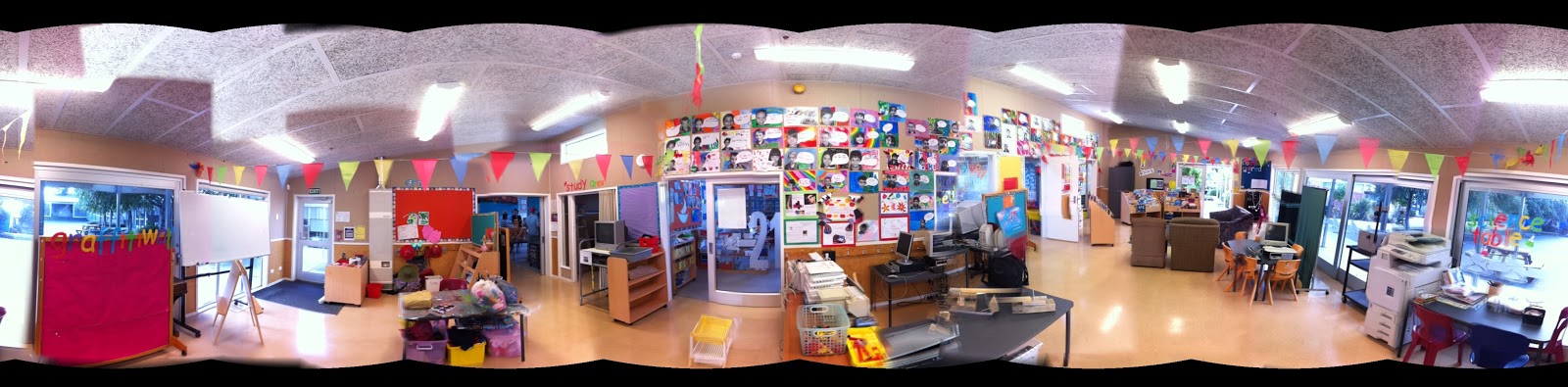 | ||||
| This is the shared Awhina area at Willowbank. A year 2, 4 and 6 class share this space. |

At this school we also gave Sharon some time to share with us (virtually via skype) what she has been doing in her classroom. She talked about the changes she has made in her classroom setup and pedagogy.


Dave was next, who like Shaun has concentrated on Online spaces. He has been using wikis (plural!) as his Classroom Portal.

Lynne was next who also has a wonderful wiki and a gorgeous room environment. What I found very special about her philosophy was that...'Yes, they are only 5 years old, but they can do anything'. This comment came after her telling everybody that in the morning students grab the laptops and go into the secret garden to play the games on the wiki.
I have asked the teachers to reflect on their day and to think about what they would like to do next time. We have several experts in different areas in our group so it looks like we will run 3 workshops on one Saturday where we share our knowledge.
From my observations the conversations that were going on were the most valuable part of the day.
I have asked the teachers to evaluate the day.
I have been asked by one of the participants what did I get out of the day.
- seeing all the people who I work with who have met each other maybe once face to face or mostly online, talking like they had been colleagues for years
- hearing the conversations that were so much about their pedagogy of teaching
- listening to teachers asking each other probing questions
- loving the fact that Sharon who lives in Ashburton was able to be part of a great professional development opportunity
- the keenness of all to continue with what we have begun and their ideas for what they would like to do next
- the passion that these teachers have for teaching and learning that they would give up their free time on weekends and nights to participate in this project
and as Dave summed it up in one of his comments on the evaluation Google Doc 'Meeting like minded people!'
Tuesday, May 10, 2011
Online and Classroom Spaces

His class wiki worked extremely well last year and was a great source of resources for his students and a show case of student work. This year he has developed that wiki to be the 'portal' for his other wikis. He has developed separate wikis for numeracy, literacy and student Learning Journeys. I have asked him to make a Quicktime movie explaining how and why he uses so many wikis which he will add to his e-Learning page on our wiki.
Steph is new to our project but has been working on developing her classroom spaces. Like Dave she teaches intermediate children (ages 11-12). Like Dave her classroom does not look like a traditional classroom...there are comfy chairs and couches scattered around the room, she has removed most of her desks for tables and students use tote trays now. What impressed me about both rooms was that children were working in a variety of different ways, some were on laptops, others were working in exercise books, some were creating large posters, others were reading. In both rooms students were working collaboratively.
So, here are two intermediate classrooms successfully integrating their classroom and online spaces, visit their wiki pages on the e-Learning classroom wiki and then look at their own classroom blogs and wikis, it will be worth your time!
Wednesday, March 23, 2011
Collaboration...not just for students!
We talk a lot about collaboration and how it is important that our students should be collaborative and co-operative with each other. It is one of our 'Key Competencies' and an important part of our e-Learning classroom.
This is also the case with the teachers who are part of the e-Learning Cluster. Through the wiki I have seen an increase in collegial support between the teachers as they post comments on individual pages, offering advice and praising achievements.
 I organised an evening chat on Skype last week, where we managed to get 7 participants available at the same time. We started at 8pm and it went for an hour but I think the teachers were quite keen to talk for longer.
It was wonderful to hear them asking questions, getting answers from each other either verbally or by posting links and downloads onto Skype.
Reading some of the updates on individual wiki pages was great feedback
Since then I have visited some of the teachers and they have commented how useful it was for them and how they are looking forward to more 'conversations'.
The main theme that came out of the discussion was how difficult it is to get the children 'self managing' and the conclusion was that the teachers have to come up with some better management techniques. This will be a new page on our wiki where we will all contribute what works and what doesn't!
We have classroom visits coming up soon, where the teachers are giving up their Saturday to share their classroom environments with us. The participants who are 'geographically challenged' (by a few 100kms or so) will participate via Skype, so that they can be with us as well. We will visit 9 classrooms in 5 schools. I think this is going to be a great learning and sharing opportunity for us all.
This is also the case with the teachers who are part of the e-Learning Cluster. Through the wiki I have seen an increase in collegial support between the teachers as they post comments on individual pages, offering advice and praising achievements.

It was wonderful to hear them asking questions, getting answers from each other either verbally or by posting links and downloads onto Skype.
Reading some of the updates on individual wiki pages was great feedback
'I found the Skype conference both reassuring and encouraging. So good to hear others discussing aspects that I too am working with.'
'Following the Skype discussion I have decided to brave Google docs for a "bus stop activity".'
'Thanks to everybody for the wonderful chat we had last week. It was great to be able to bounce ideas off each other.'
Jane who is one of the observers said 'was interesting to hear others and to see that people in our school are implementing ideas from the conversation, great way to collaborate across the country'
Since then I have visited some of the teachers and they have commented how useful it was for them and how they are looking forward to more 'conversations'.
The main theme that came out of the discussion was how difficult it is to get the children 'self managing' and the conclusion was that the teachers have to come up with some better management techniques. This will be a new page on our wiki where we will all contribute what works and what doesn't!
We have classroom visits coming up soon, where the teachers are giving up their Saturday to share their classroom environments with us. The participants who are 'geographically challenged' (by a few 100kms or so) will participate via Skype, so that they can be with us as well. We will visit 9 classrooms in 5 schools. I think this is going to be a great learning and sharing opportunity for us all.
Subscribe to:
Posts (Atom)